Customer Journey Map

Most product teams have a Customer Journey Map somewhere. On a wall, buried in a Miro board, or lurking in a Confluence page from two years ago. It rarely gets updated, almost never drives decisions, and often reflects what the organization wanted to be true about the customer rather than what actually happens. A good Customer Journey Map is the opposite of that. It’s a living, research-grounded view of how real customers move through your product, and the moments where your experience either earns their trust or quietly erodes it.
Done well, a Customer Journey Map becomes one of the most useful artifacts in Product Management. Done badly, it becomes wallpaper.
What is a Customer Journey Map?
A Customer Journey Map is a visualization of the end-to-end process a customer goes through to achieve a specific goal with your product or service, including their actions, thoughts, emotions, and pain points at each stage. It turns fragmented customer data into a shared narrative that product teams can act on.
A Customer Journey Map typically follows a single persona across a scoped scenario (signing up, renewing, getting help, completing a purchase). It stitches together what the customer is trying to do, what they actually do, what they feel while doing it, and where the experience delivers or disappoints. The Nielsen Norman Group defines it as “a visualization of the process that a person goes through in order to accomplish a goal”, which is intentionally broad. The power sits in how narrow and specific your actual map becomes.
A Customer Journey Map is a research artifact and an alignment tool at the same time. The research side documents what is really happening. The alignment side forces teams in different parts of the business to agree on what the experience looks like and where it needs fixing.
What should a Customer Journey Map include?
Every useful Customer Journey Map shares a handful of core ingredients. Skipping any of them weakens the map, because each element plays a distinct role in turning raw research into something a team can actually decide with.
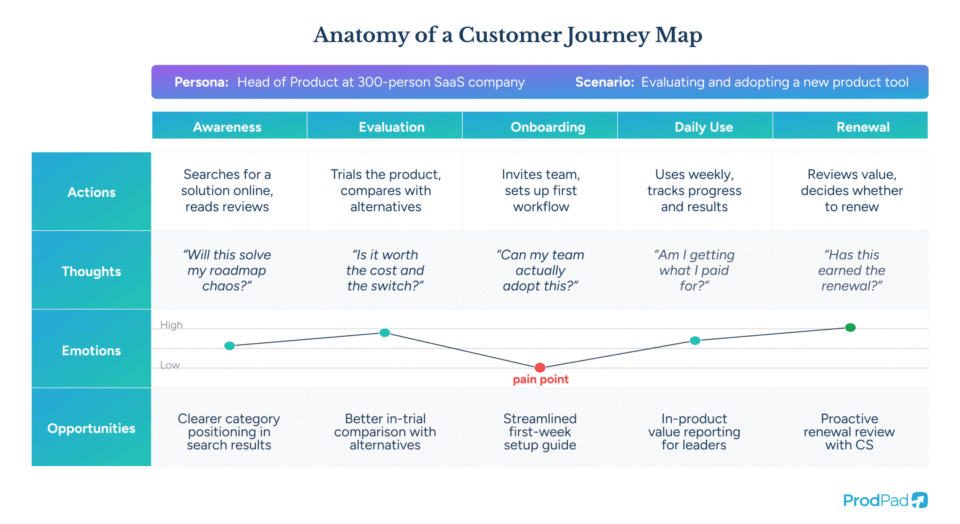
The actor and scenario
The actor is the person whose journey you are mapping. Usually this maps to one of your user personas, grounded in real research rather than a composite of wishful thinking. The scenario is the specific thing that actor is trying to accomplish: renewing a subscription, onboarding a new team, submitting an expense claim, recovering from a failed payment. One Customer Journey Map, one actor, one scenario. Trying to map three personas across four scenarios on a single canvas is the fastest way to produce something that says nothing clearly.
Phases and actions
The journey is then broken into high-level phases, and within each phase, the specific actions the customer takes. Phases usually cluster around recognizable shifts in mindset: awareness, consideration, onboarding, routine use, renewal, and so on. Actions are the concrete steps inside each phase. The level of detail should match the decision you want the map to inform. A map designed to reduce first-week churn should go deep on the first seven days. A map designed to improve enterprise renewals might only show a few awareness-stage steps but fifteen steps inside renewal.
Thoughts, feelings, and pain points
Alongside each action, a Customer Journey Map captures what the customer is thinking, what they are feeling, and where the friction is. This is the layer that separates a Customer Journey Map from a flowchart. The emotional line across the map shows where the experience peaks, where it drops, and where expectations meet reality. These drops are the signal. An NN/g analysis frames this as finding the “moments of truth” where the experience either confirms or violates expectations, and those moments are where product decisions tend to pay off the most.
Opportunities, metrics, and ownership
A Customer Journey Map without opportunities is a diagnosis without a prescription. Each pain point surfaced by the map should connect to an opportunity, a metric that would tell you if the opportunity has been addressed, and a team or individual who owns the fix. Mapping internal ownership onto the customer’s experience is often where the most uncomfortable conversations happen, because many friction points live in the gaps between teams. Those gaps are exactly where the map earns its keep.
Customer feedback is the raw material for every good journey map. See how product teams are collecting, triaging, and acting on feedback in Collecting Customer Feedback.
Why a Customer Journey Map matters for product teams
A Customer Journey Map does three things that no other product artifact does as well, and those three things tend to show up directly on the roadmap.
It breaks the inside-out view
Most product decisions are made from the inside of the organization looking out. The team sees features, endpoints, and workflows. The customer sees a single continuous experience that does or doesn’t help them get something done. A Customer Journey Map forces the inside-out view to flip. It lays out the experience as the customer actually encounters it, across your product, your support channels, your billing system, your onboarding emails, and every other touchpoint they collide with along the way.
It surfaces problems that no single team owns
Research from Nielsen Norman Group found that journey maps tend to succeed most at “creating alignment among teams” and “educating internal parties about pain points”, and those two outcomes go together. When Marketing, Sales, Product, and Customer Success all see the same map, it becomes obvious which friction points are orphaned, sitting in the seams between departments where nobody is actively responsible. Those orphan problems often become the highest-impact, lowest-politics opportunities on a roadmap.
It grounds prioritization in real behavior
Prioritization arguments tend to get stuck when each stakeholder has a different mental model of the customer. A Customer Journey Map gives the team a shared artifact to point at. Instead of debating whether a particular fix matters, you can point to the journey, show where the experience drops, and quantify the cost of the drop. It makes the prioritization conversation concrete.
How is a Customer Journey Map different from other product artifacts?
Customer Journey Maps overlap with several other familiar tools, and the overlap causes confusion. It helps to get specific about where each one fits.
Customer Journey Map vs. user flow
A user flow is a detailed diagram of the specific steps a user takes inside a digital product to complete a task, usually at the screen or interaction level. A Customer Journey Map zooms out further, across the whole experience, including offline and cross-channel touchpoints. User flows tell you whether a feature is designed well. A Customer Journey Map tells you whether the right features exist in the right order to serve the customer’s goal at all.
Customer Journey Map vs. service blueprint
A service blueprint is the operational flipside of a Customer Journey Map. Where the map shows what the customer experiences, a blueprint shows everything happening behind the scenes to produce that experience: the frontstage staff, the backstage systems, the support processes, the supply chains. Teams that run both in parallel get a complete picture of where experience breakdowns come from.
Customer Journey Map vs. User Story Map
A User Story Map, popularized by Jeff Patton, is a tool for organizing product work. It arranges user activities and stories across a backbone so teams can prioritize delivery. A Customer Journey Map is a tool for understanding the customer, not organizing delivery. The two work well together: the Customer Journey Map identifies what needs solving, the User Story Map breaks the solution into buildable pieces.
Customer Journey Map vs. experience map
An experience map is broader and persona-agnostic, mapping a general human behavior (booking travel, managing finances) rather than one persona’s journey with one product. Customer Journey Maps are tighter, tied to specific personas and specific product interactions. Experience maps are useful for early-stage strategic thinking. Customer Journey Maps are for driving product decisions inside a live product.
Want to explore how journey insights flow into product decisions? Try the ProdPad sandbox and walk through how feedback, ideas, and roadmap items link together.
How to build a Customer Journey Map
A Customer Journey Map is only as good as the process behind it. Teams that treat it as a whiteboard exercise usually end up with fiction. Teams that anchor it in research, scope it tightly, and tie it to business goals tend to come out with something they actually use.
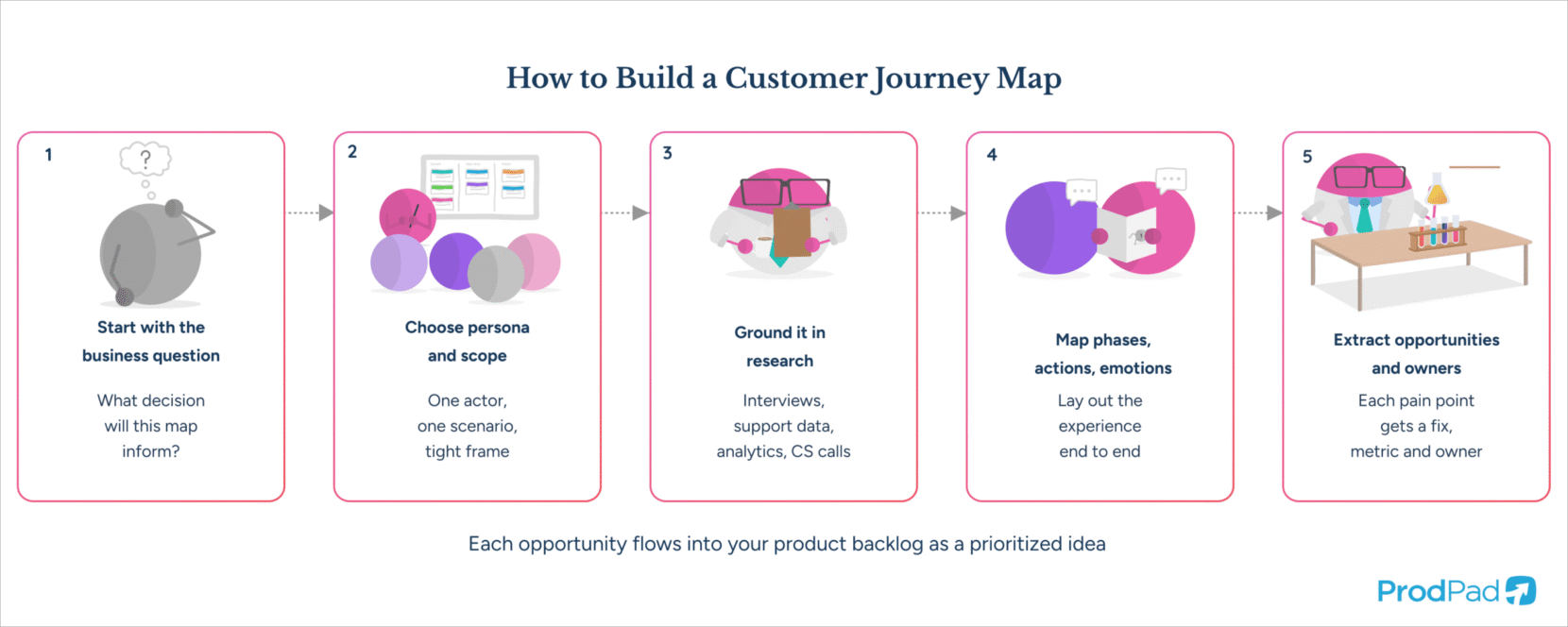
Step 1: Start with the business question
Every Customer Journey Map should serve a specific decision. Before picking up a sticky note, get clear on what problem the map is meant to address. Reducing churn in the first thirty days, improving renewal rates in enterprise accounts, understanding why referrals are flat. A map without a business question attached tends to drift toward “everything the customer does, ever,” which is useful to nobody.
Step 2: Choose the persona and scope
Once you have the business question, pick the persona whose journey is most relevant to it, and pick the scoped scenario inside that persona’s life with your product. If multiple personas matter, build multiple maps. Compressing them into one is false efficiency. The approach to building personas you use here matters, because a persona built on assumptions will produce a map built on assumptions.
Step 3: Ground it in research
This is the step teams most often skip, and it is the step that separates a real Customer Journey Map from a guess with sticky notes. Research for a Customer Journey Map typically includes customer interviews, support ticket analysis, NPS and survey responses, session recordings, analytics, and conversations with customer-facing teams. Teresa Torres’ work on continuous discovery is a strong reference here: the research that feeds a journey map should not be a one-off project. It should come from a steady rhythm of customer contact, ideally as part of your broader product discovery practice.
Step 4: Map phases, actions, and emotions
Working from the research, lay out the journey as the customer actually experiences it. Phases across the top, actions within each phase, and beneath those, the thoughts, feelings, and friction points the research surfaced. Resist the urge to make it look polished before the content is right. A rough map with accurate content beats a beautiful map with guesswork every time.
Step 5: Extract opportunities and assign owners
For every pain point in the map, pair it with an opportunity, a success metric, and an owner. Without owners, the opportunities become ambient complaints. With owners, they become backlog items that someone is accountable for moving forward. This is the step that connects the Customer Journey Map to the rest of your product system, and it is the one that most teams rush.
Where Customer Journey Maps go wrong
Customer Journey Maps fail predictably, and the failure modes are almost always about how the map is created or used rather than the idea itself.
Treating it as a one-time deliverable
A Customer Journey Map built as a project, presented once, and filed away becomes obsolete quickly. Customer behavior changes, products change, market conditions change. The map should be revisited at a regular cadence, ideally alongside each strategic planning cycle, and updated with fresh research rather than institutional memory.
Mapping in a research vacuum
Teams under deadline pressure often build Customer Journey Maps in a conference room without ever talking to a customer. The output is a projection of what the team assumes customers do, which tends to match the product team’s mental model rather than reality. Research-free maps reinforce existing blind spots instead of exposing them.
Building maps that never reach product decisions
This is the most common failure mode. The map is built, the workshop is energizing, the artifact looks impressive, and then it sits on a wiki while the roadmap continues to get shaped by internal politics, sales requests, and loudest-voice prioritization. A Customer Journey Map only earns its cost if the opportunities it surfaces make it into the backlog and get prioritized.
Making the map too broad
An enterprise-wide, cradle-to-grave journey map covering every possible customer type is usually a signal that nobody could decide what the map was for. Broad maps look thorough and deliver almost nothing actionable. A narrow, deep map of a specific persona doing a specific thing tends to produce five concrete opportunities in a week. The broad version produces one pretty poster.
Feedback is only useful when it’s organized, prioritized, and connected to decisions. See how product teams close the loop in How to Build a Customer Feedback Strategy.
How a Customer Journey Map connects to your roadmap
A Customer Journey Map is not the end of the process. It is the start. The insights it surfaces should feed directly into the way your team decides what to build next.
Inside ProdPad, this connection is deliberate. Customer feedback from journey research lives in the same system as the product ideas it informs, which live in the same system as the Now-Next-Later roadmap where those ideas get sequenced, and the OKRs that measure whether the outcome actually moved. A friction point spotted during journey mapping becomes a tagged piece of feedback, which clusters with related feedback, which validates an idea, which gets prioritized on the roadmap against the opportunity it addresses. The journey map does not sit outside the product system. It feeds it.
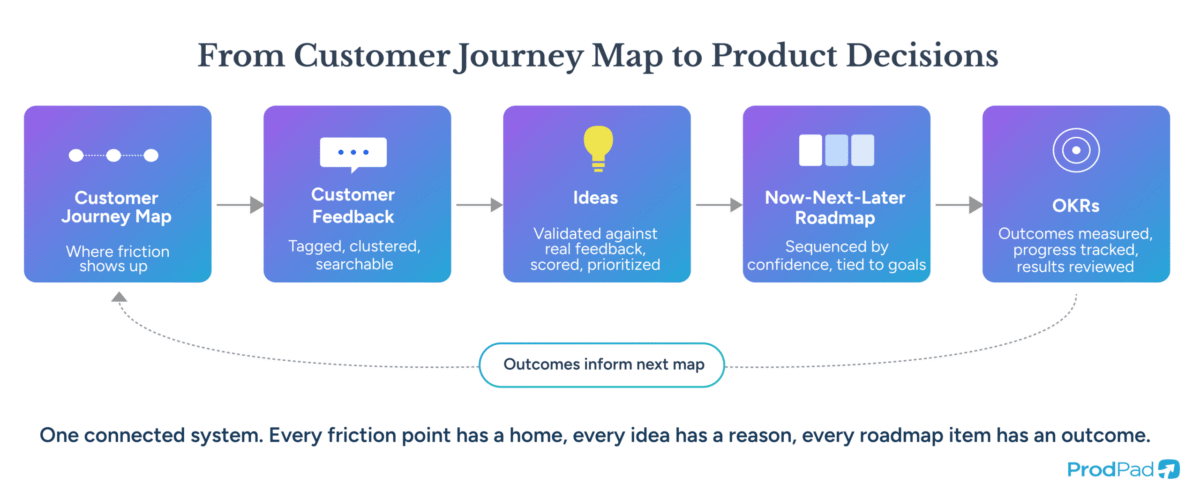
This connection is what keeps the Customer Journey Map honest. When a pain point has no corresponding idea, or an idea has no corresponding pain point, the gap becomes visible. When an idea ships, the customers whose feedback informed it can be notified automatically, closing the loop that most organizations struggle to close at all. Research from ProdPad’s early work on the customer feedback portal showed that the ability to link feedback back to specific customers and follow up with them was one of the most consistently valued behaviors, because it is the bit most organizations lose.
A Customer Journey Map that connects to product decisions is a strategic asset. A Customer Journey Map that sits in isolation is a decoration.
See the roadmap your journey opportunities should feed into. Grab the free, interactive Now-Next-Later roadmap template from the inventors of the format.
Where Most Customer Journey Maps Lose Their Power
The Customer Journey Map is a powerful artifact, but its power is entirely conditional. It depends on the quality of the research beneath it, the tightness of its scope, and, more than anything, the mechanism by which its insights make it into product decisions. Most Customer Journey Maps fail at the third part. Teams invest in the research and the visualization, then lose the thread between the map and the backlog.
The fix is structural. When feedback, ideas, roadmap items, and objectives live in the same connected system, the journey map stops being a one-off deliverable and becomes a feed into how the team decides what to do next. That shift, from artifact to system input, is what turns a Customer Journey Map from a workshop souvenir into a continuous source of product direction. The teams that get this right tend to build products their customers actually want to keep using, because the experience is being shaped by what is actually happening in it rather than what the organization assumes.
Enjoy a single source of truth for every product idea
Start a free trial and see how easy your Product Management life could be with ProdPad