Best Product Roadmap Software in 2026: Features, Pricing, and How to Choose

What is product roadmap software?
Building a product roadmap is a vital and incredibly useful process for any product manager, and the right roadmapping software can make the difference between a clear, insightful, and flexible plan that anyone can understand, and a chaotic mess of missed deadlines and broken promises.
A well-made roadmap will help to ensure your teams are aligned with your product vision, and it’ll help you to build trust and excitement with your users and potential customers. It can even improve productivity and motivation – knowing that everyone else is on the same page as you can do wonders.
In this article, we’ll break down what you should be looking for in your product roadmap software, then we’ll share our top picks of the bunch, as well as a few honorable mentions.
We’ll also compare some of the best product roadmap software options available today, highlighting where each tool works best.
Why use product roadmap software?
Product roadmap tools provide a structured and visual way to outline the product development journey. It helps teams create a strategic plan, prioritize tasks, and communicate their vision effectively across departments.
Whether you’re a lean startup or a profitable enterprise, using dedicated roadmapping software can lead to increased efficiency, better collaboration, and more informed decision-making.
Sharable, easy-to-understand roadmaps can help to ensure that all your stakeholders know what you’re working on and why. They foster communication and help to ensure that your different teams aren’t stuck in silos without an understanding of the bigger picture.
The best product roadmap software will also provide you with tools to help you prioritize your work and organize your backlog. In-built prioritization scoring options and frameworks can help you to ensure you’re staying on top of things, and using your resources as efficiently as possible.
Since the latest wave of AI advancements hit the scene, the quickest-moving teams have already harnessed these powerful tools to provide time-saving (and thus money-saving) AI-powered features. Much of the less inspiring or more time-consuming tasks can now be made much quicker and easier using these innovative systems.
Curious how AI actually fits into day-to-day product work? Read our ebook on The Product Manager’s Guide to Using AI to Work Better and Faster
Key benefits of using product roadmap software
Finding the right product roadmap software offers numerous advantages, including:
- Enhanced Collaboration: Teams can work together, regardless of their physical location, to align their efforts and contribute to the roadmap.
- Clear Communication: A well-structured roadmap provides stakeholders with a clear understanding of your product’s direction and goals.
- Adaptability: As market conditions change or new insights emerge, you can easily adjust your roadmap to stay in line with your business’s evolving needs.
- Efficient Resource Allocation: By prioritizing features and tasks, you can allocate resources effectively to ensure timely delivery.
- Increased Accountability: With a documented roadmap, responsibilities are clear, and accountability is heightened across the organization.
Top features to look out for
When considering product roadmap software, certain features can greatly enhance your planning and execution processes. Look for software that offers:
- Customizable roadmaps: The ability to create roadmaps that suit your product’s unique needs and adapt as your strategy evolves.
- Collaboration tools: Features that facilitate communication and collaboration among cross-functional teams, ensuring everyone is on the same page.
- Prioritization capabilities: Tools that help you prioritize features and tasks based on factors like customer feedback, business goals, and market trends.
- AI assistance: Effective AI-powered tools can potentially save you a lot of time that would otherwise have been spent on day-to-day tasks.
- Integrations: Seamless integration with project management, development, and communication tools to streamline workflows.
- Shareable roadmaps: Clear, accessible visual representations of your roadmap, making it easier for all stakeholders to understand and engage with your plans.
- Analytics and reporting: The ability to track progress, analyze results, and gather insights to refine your strategy.
Top 8 product roadmapping tools
While all of the product roadmap software listed below will help you create a roadmap, the one that is right for you will depend on the size of your team, the complexity of your product, whether you’re managing a single product or a portfolio, and more.
One note on the listed prices: all the prices below include annual discounts where offered, so if you are planning on paying monthly you will likely end up paying slightly more.
1. ProdPad
Price: Modular, starting at $24 p/m
Free trial: As long as you need
Good for: Lean startups, SMEs, and enterprises looking for comprehensive, time-saving, and user-friendly roadmap software.
ProdPad is an end-to-end product management software made by product managers, for product managers. With a very user-friendly interface, it helps you to get up and running with a minimum of fuss, and will help you get the best from the entire product journey.
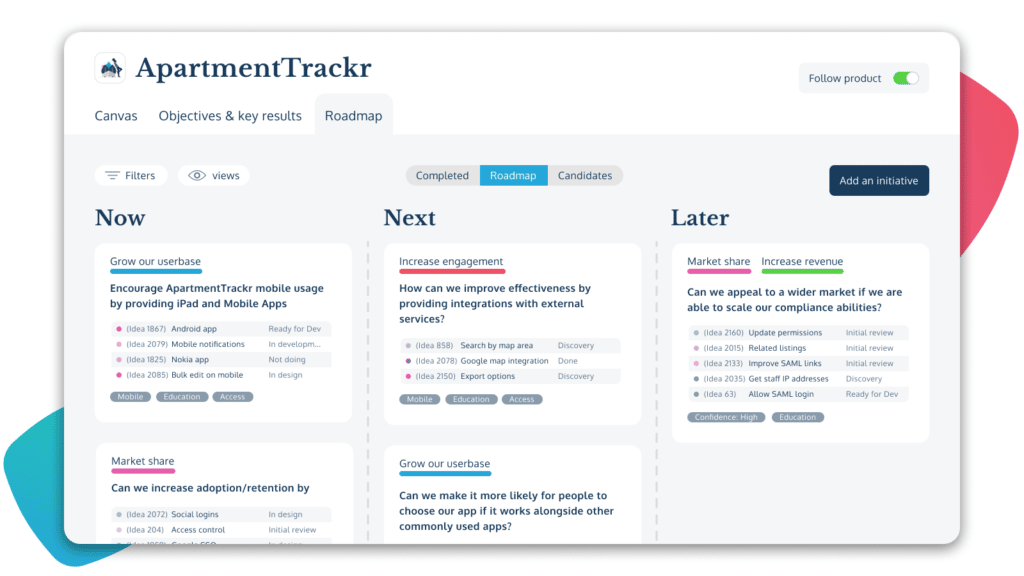
The sharable roadmaps are simple to understand yet rich with nested detail, so even someone who’s never heard of your product could look at it and know what’s going on. They can be organized in a number of ways, allowing you to visualize your plans for your entire portfolio. It even ties your OKRs directly into your roadmap, to help various stakeholders understand your strategy and how it aligns with your product vision.
This is particularly useful as teams scale, when product decisions are no longer made in a single room and the cost of misalignment increases. Being able to see why something is on the roadmap, not just what is planned, becomes essential rather than a nice-to-have.
ProdPad’s modular price plans help you to pick exactly what you need from the range of features available, and its generous free trial starts at 7 days, though it gets longer the more you use it, allowing you all the time you need to really work out how it can improve your workflow.
ProdPad has also recently rolled out a growing range of AI-powered tools to help reduce your day-to-day workload. It can write your feature ideas for you, so you can get on with solving your users’ problems. It can discover common themes in your customer feedback, link that feedback to initiatives, detect duplicate ideas in your backlog, analyze how well your ideas fit your product vision, and much more.
With just a few prompts and a few minutes, you can go from a blank page to a fully developed roadmap that has feature ideas that are linked to supporting customer feedback and tied in to measurable objectives. It will help ensure your roadmap is fully aligned with your business goals and strategy, and that you’re not wasting your time focusing on the wrong thing.
ProdPad also fosters communication and collaboration across all your teams, with unlimited reviewers able to see and contribute to your feature ideas and lend their expertise and insights to the development process.
All in all, ProdPad isn’t just product roadmap software. It’s a user-friendly end-to-end suite of product management tools that will empower you to make products that solve your users’ problems, and will save you time and effort while you do it.
Top Features:
Idea and feedback management: Streamline the collection and prioritization of ideas and feedback from various sources, including a customizable customer feedback portal.
Customizable and sharable roadmaps: Roadmaps that are simple to understand, but rich with contextualized information on product planning, bringing together strategic direction and day-to-day product management
Outcome-based roadmapping: ProdPad ties in Objectives and Key Results directly into the Now-Next-Later roadmap (invented by ProdPad co-founder and CEO Janna Bastow), so anyone who looks at it can easily see how each initiative is working towards company objectives, and the metrics used to define success.
See what outcome-based roadmapping actually looks like in practice here
Innovative AI-driven tools: ProdPad is at the forefront of the AI revolution, with GPT-powered tools to help you write up feature ideas, create user stories, analyze how your ideas fit with your product vision, find themes and opportunities in your customer feedback, and more.
Product Portfolios: Top-level view that brings together all the information on your products. Gives every member of your team, and customers, a practical overview of your strategic objectives. with tailored and accessible resources on current and future product offerings.
User Personas & Feedback: In ProdPad, your customer’s problems, needs, and desires are fundamentally built in to the workflow. User personas and real customer feedback can be fed into every stage of the decision-making process.
Collaboration: ProdPad offers a dynamic environment to communicate ideas and developments. Team members can contribute and provide input in a way that fits with their daily jobs, while product managers retain control while being able to tap into diverse sources of insight and innovation.
Integrations and Export: ProdPad has a wide range of integrations and export options, from workflow software like Jira and Trello, to customer feedback solutions such as Salesforce and Slack, and even a live API and Zapier integration.
Pros:
- User-friendly interface for easy adoption.
- Robust prioritization tools for informed decision-making.
- Wide range of integration options
- Exceptional customer support for prompt assistance.
- Publicly sharable roadmaps that can be adjusted depending on the audience.
- Powerful GPT-powered AI tools to help you work more efficiently.
Cons:
- Provides so much information and feedback that it can be overwhelming for inexperienced product managers.
- Advanced analytics might be limited in lower-priced plans.
- @ Megan – I feel like we should add another one here for the sake of balance, but can’t think of something mild enough to fit.
2. monday.com
Price: Paid plans including roadmaps start from $20 p/m
Free trial: Free basic plan (limited features)
Good for: Large teams that will be able to take advantage of all the options available
Not satisfied with just being product roadmap software and providing for just one part of your workflow, monday.com has positioned itself as a full-spectrum “Work OS”. With a wide range of integrations, customizable automations, and an inbuilt app marketplace, it has the potential to be your one-stop-shop for all your products and projects. However, this also means it’s very complicated to set up.
Roadmaps are just a part of this, though they aren’t available on the basic plan so you’ll need to pay more to access them. Unfortunately, monday.com only provides timeline and Gantt charts, beyond the basic Kanban style, as your roadmap options.
Essentially, this is a powerful project management tool that can also be useful in product management, if you don’t mind paying more, and working out the complex automation system required to get everything working the way you want.
Top Features:
Customizable Boards: Create custom boards to match your product’s development stages.
Task Tracking: Monitor tasks, deadlines, and progress within a visually appealing interface.
Integration with Third-Party Apps: Seamlessly connect with other tools your team already uses.
Automation: Set up automated responses to certain events, cutting down on busy work
Collaboration Tools: Foster communication and teamwork through built-in features.
Pros:
- Only provides timeline and Gantt chart roadmaps
- Versatile platform catering to various business needs.
- Highly customizable interface for personalized workflows.
- Easy-to-use task tracking for streamlined project management.
- Extensive integration options.
Cons:
- Most features require higher-priced plans.
- Steep learning curve for complex setups.
- Automation can fail, potentially causing major issues.
3. airfocus
Price: Plans start at $69 p/m
Free trial: 14-day
Good for: Small teams with a decent budget seeking simple prioritization and roadmapping software.
This is theoretically one of the easier-to-use options on the list, with a pretty intuitive interface and a straightforward process for building a basic roadmap in a short time. It’s customizable, flexible, and sharable, and can be a useful roadmapping tool for product managers.
There are also a number of prioritization tools, such as airfocus’ proprietary game Priority Poker. It’s essentially an in-app method of gathering prioritization scores from a variety of stakeholders, in which you have a deck of cards from 1 to 10, and use them to pick your most and least preferred initiatives.
However, airfocus has quite a high price point, especially given that it doesn’t provide much support for product development and management beyond roadmapping and prioritization. Given that smaller teams are the ones most likely to benefit from its ease of use, this could be a stumbling block. It also lacks AI assistance or automation options, increasing the time you need to spend using it as part of your workflow.
Top Features:
Simple-to-use: Helpful with getting a roadmap up and running quickly.
Prioritization tools: Includes prioritization and scoring frameworks to help with managing your workflow.
Priority Poker: Provides an interactive in-app prioritization game similar to Buy-a-Feature.
Roadmap visualization: Create clear, shareable roadmaps to align teams and stakeholders. Offers outcome-based roadmaps, along with other options like Gantt charts on higher-tier plans.
Pros:
- Intuitive interface for quick adoption.
- Data-driven prioritization for objective decision-making.
- Risk assessment and mitigation features for comprehensive planning.
- Integration capabilities for a seamless workflow.
Cons:
- Advanced features are limited to higher-tier plans.
- Pricing might be a challenge for smaller teams.
- Lacking automation or AI assistance.
4. Wrike
Price: Plans start at $10 p/m
Free trial: Free basic plan
Good for: Teams seeking an all-in-one project management solution.
Another all-in-one workflow suite, in a similar vein to monday.com. Wrike provides a huge range of options to cover almost any aspect of your work. It is highly versatile and can be very useful in encouraging communication and alignment across departments.
Its lower-tier plans are cheaper than its main competitors, though the more powerful tools are locked behind a much more expensive tier. Roadmapping options are somewhat limited, with just Kanban boards and Gantt charts on offer.
Another great feature of Wrike is its customizable workflow. Teams can create their own workflows that align with their specific needs and processes. This flexibility ensures that every team member can work in a way that suits them best, leading to increased productivity and better outcomes.
While Wrike is a powerful project management tool, it is less directly useful for product people due to the limited roadmap options, as well as the somewhat clunky and dated user interface.
Top Features:
Agile project management: Enables using Agile methodologies for flexible project execution.
Resource Management: Efficiently allocate resources and manage workloads.
Advanced Reporting and Analytics: Offers robust reporting tools that provide insights into project progress, team performance, and resource utilization.
Time Tracking and Budget Management: Enables users to track time spent on tasks and projects, aiding in accurate billing and budget management.
Pros:
- Comprehensive project management functionalities.
- Real-time collaboration for efficient teamwork.
- Good range of integration options.
- Free templates to fit various working methodologies.
Cons:
- Unintuitive, dated UI.
- Only Gantt charts and Kanban roadmaps.
- Learning curve for complex project setups.
- Might offer more than needed for smaller projects.
5. Craft.io
Price: Plans start at $19 p/m
Free trial: 14-day
Good for: Larger teams seeking a comprehensive product management platform.
Craft.io is a solid option for agile teams seeking a versatile product management kit. The robust analytics and reporting features address the growing importance of data-driven decision-making in today’s business landscape.
Its impressive integration capabilities enable blending it with existing workflows, reducing friction in collaboration, although migrating work over from other tools can be time-consuming.
It’s worth noting that Craft.io’s pricing structure might pose challenges for smaller teams or startups with limited financial resources. While much of the roadmapping functionality is available on the basic plan, many of the tools most useful to Agile teams are only available on more expensive plans, and don’t actually come as part of the package but are paid add-ons.
The emphasis on end-to-end product management features is undoubtedly a strength, but it results in a steeper learning curve for those seeking to take advantage of the customization options.
Top Features:
Idea Collection and Management: Provides a centralized platform for gathering, organizing, and managing ideas from various sources, such as team members, stakeholders, and customers.
User Story Mapping: Enables teams to create visual representations of user stories, features, and tasks.
Customization Options: Offers customization capabilities, enabling teams to tailor the software to their specific workflows and processes.
Analytics and Reporting: Robust analytics and reporting to track the progress of tasks, monitor KPIs, and gather insights into performance.
Good roadmap options: Provides a number of options for displaying your roadmap, from old-fashioned timelines to lean, outcome-based roadmaps.
Pros:
- Good variety in roadmap options.
- Robust analytics and reporting capabilities.
- Integration with many popular tools.
- Numerous useful features for end-to-end product management.
Cons:
- Pricing might not suit smaller teams or startups.
- Many useful features are only available on higher-tier plans.
- Steep learning curve for making the most of the customization options.
6. Roadmap.space
Price: Plans start at $19 p/m
Free trial: 14-day
Good for: Design-focused teams wanting to create visually appealing roadmaps.
Roadmap is a relatively simple entry into the roadmap software market. Perhaps unsurprisingly, it excels at creating visually engaging and comprehensible roadmaps. It makes it easier for all stakeholders, from team members to executives, to quickly understand the product’s strategic direction and timeline.
Its Presentation mode helps when sharing it with stakeholders across your organization, and its sharing options, such as embedding your roadmap into your app, aid in driving engagement.
Roadmap also provides a solid customer feedback system that integrates with a number of feedback sources, providing you with a single inbox for all of your feedback. It also helps to close the feedback loop, by keeping users updated on any actions that have been taken as a result of their feedback.
However, as it is one of the simpler tools on the list, it might not have enough functionality under the hood to satisfy larger teams, or more complex products with multiple dependencies.
Top Features:
Intuitive Visual Roadmaps: Helps to create visually appealing and easy-to-understand roadmaps.
Simple: If you don’t have complex product management needs and just want a roadmap, Roadmap is a decent choice with a shallow learning curve.
Presentation Mode: Offers a mode that enables users to maximize their roadmap’s visual impact in meetings or presentations.
Feedback management: Provides a consolidated source of feedback, and enables users to track the progress of actions taken as a result.
Pros:
- Visually pleasing interface for engaging roadmaps.
- Ease of use in creating and modifying roadmaps.
- Emphasis on collaboration facilitates alignment and communication
Cons:
- Might be more design-oriented than feature-rich for some teams.
- Doesn’t provide much support for product management beyond roadmaps.
7. Ignition GTM
Price: Modules start at $16, plans start at $79
Free trial: Free basic plan
Good for: Agile teams looking for a comprehensive package to help bring a new product to market.
G2 score: 5/5 ⭐ (though only 7 reviews at the time of writing)
Ignition describes itself as a Go-To-Market (GTM) tool, aiming to provide you with everything you need to get your product into the hands of your prospective customers.
It provides for Kanban and timeline roadmaps, which is not an extensive range of options, but where it really shines is in how it leverages the roadmap to help you create a fully-fledged marketing plan using AI suggestions from their ‘Copilot’.
It will even automatically generate a timeline roadmap for you (though it’s still a timeline, so your mileage may vary). Getting started on Ignition is a relatively simple process if you’re already familiar with Agile methodologies.
Ignition is a solid choice for planning your next release, though it may be of more use as a whole package to product marketers rather than product managers. It might be difficult to establish if it works for your team, however, as the basic free plan is very limited in scope.
Top Features:
Enables Agile project management: Supports Agile methodologies for efficient project execution.
Good analytics and reporting: Provides a robust suite of tools to track performance.
AI assistance: AI-powered tools help with getting set up and managing your workflow.
Easy-to-use interface: Relatively low bar for entry thanks to the simple interface.
Pros:
- Agile-friendly platform for streamlined work processes.
- Solid product management features for effective execution.
- Integration capabilities allow linking with other PM tools.
- Templates and automation make getting set up easier.
Cons:
- Modular and granular pricing structure can be complex to navigate
- Limited features in free basic plan might hinder thorough evaluation.
- Majority of advanced features restricted to higher-tier plans or modules.
- Only timeline and Kanban roadmaps.
8. Trello
Price: Plans start from $5
Free Trial: Free basic plan
Good for: Small teams seeking lightweight product management with roadmap capabilities.
Chances are you might already be using Trello as part of your day-to-day workflow. It’s a simple and effective tool for managing your tasks, tracking progress, and enabling communication in your teams.
It’s very easy to use, though it also customizable and you can create a number of templates to help reduce the busy work of writing out your ideas and initiatives. It’s quick to learn, and the free plan works plenty well for most of what you’ll want it to do.
In terms of roadmapping it’s relatively limited, though for smaller teams and internal communications it’s not a bad choice, allowing you to present a simple view of your current priorities, what’s next in the pipeline, and what you’re considering doing down the line.
It also integrates with a wide range of other product management tools, so if you start off using Trello and decide to go with a more robust option later, you should be able to easily migrate, or even keep Trello as part of your larger workflow.
Top Features:
Kanban-Style task management: Intuitive interface organizes tasks using a visual Kanban board, making it easy to track progress and manage workflows.
Customizable boards: Users can create custom boards that match their product development stages, team processes, and specific requirements.
Integrations: Connects with various tools to enhance collaboration and streamline workflows.
Collaboration tools: Trello’s interactive features facilitate teamwork, allowing team members to communicate, comment, and share attachments directly within tasks.
Simple task prioritization: Users can categorize tasks using labels, due dates, and checklists, enabling basic prioritization within the board.
User-friendly interface: Trello’s straightforward design and drag-and-drop functionality ensure a quick learning curve and easy adoption.
Pros:
- User-friendly design makes it an accessible tool for teams of all skill levels, allowing for quick onboarding and adoption.
- While not as comprehensive as dedicated roadmap tools, Trello’s customizable boards enable a simple visualization of project stages.
- Free plan provides a viable option for startups and small teams with limited budgets, offering core functionality without cost.
- Ability to integrate with various third-party tools allows teams to incorporate it into their existing workflows.
Cons:
- Roadmap capabilities are limited, making it more suitable for simpler project management needs.
- Lacks the scalability and advanced features needed for larger projects or organizations.
How to choose product roadmap software
With so many capable tools on the market, choosing the right product roadmap software isn’t really about finding “the best” one. It’s about finding the right fit for how your team works, and how you expect it to evolve over the next few years.
Before you decide, it helps to step back and look at three practical dimensions: your team, your scale, and the outcomes you’re trying to drive.
1. Start with how your team actually works
Before you look at features, look at behaviour.
Some teams need little more than a clear, shareable view of priorities. Others need a roadmap that connects strategy, delivery, customer feedback, and performance metrics.
Ask yourself:
- Is product management a dedicated role, or shared across functions?
- Do stakeholders regularly ask why things are being built?
- Do you need collaboration across multiple teams, or just a single squad?
If your team is small and delivery-focused, lightweight tools may be enough. As soon as decision-making becomes distributed, however, tools that support context, collaboration, and transparency start to matter much more.
2. Consider scale, not just size
Scale isn’t just about headcount. It’s about complexity.
You may only have a small product team today, but if you’re:
- Managing multiple products
- Supporting different customer segments
- Balancing commercial, technical, and user-driven priorities
…then roadmap software that works at both initiative level and portfolio level becomes increasingly valuable.
Many teams outgrow timeline-only roadmaps because they struggle to adapt when priorities change. Outcome-oriented and Now-Next-Later style roadmaps tend to scale better, especially in fast-moving environments.
3. Focus on outcomes, not just plans
Different tools optimize for very different conversations.
One of the biggest differences between roadmap tools is what they optimize for.
Some tools are great at visualising plans. Others help teams connect:
- Customer feedback to ideas
- Ideas to initiatives
- Initiatives to objectives and measurable outcomes
If your roadmap is mainly used for reporting, simple visuals may be enough. If it’s used as a decision-making tool, you’ll want software that keeps evidence, intent, and success criteria close to the work itself.
This becomes especially important in 2026 and beyond, as AI-assisted product teams move faster and expectations around clarity and accountability increase.
4. Look beyond features to long-term fit
The real test is whether the tool still works a year from now.
It’s tempting to choose roadmap software based on a checklist of features. A better question is:
Will this tool still support how we work a year from now?
The strongest tools tend to:
- Adapt as your product practice matures
- Support different audiences with different views
- Reduce admin and busywork rather than add to it
Ultimately, the right product roadmap software should make it easier to have better product conversations, not just prettier roadmaps.