Prototype

A working prototype used to take a designer a week and an engineer a sprint. Now a Product Manager can describe a feature to an AI tool before lunch and have something clickable by the time the coffee goes cold. That speed is genuinely useful, and it has quietly created a new problem: prototypes look more finished than ever, so teams and stakeholders keep mistaking them for decisions. The value of a prototype was always in the question it answered. Cheap production makes that question easier to skip, and skipping it is where the trouble starts.
What is a prototype in product management?
A prototype is a cheap, disposable version of a product idea, built to answer one specific question before your team commits to building the real thing. It can be a paper sketch, a clickable design, or AI-generated code. A prototype is worth exactly what it teaches you, and nothing more.
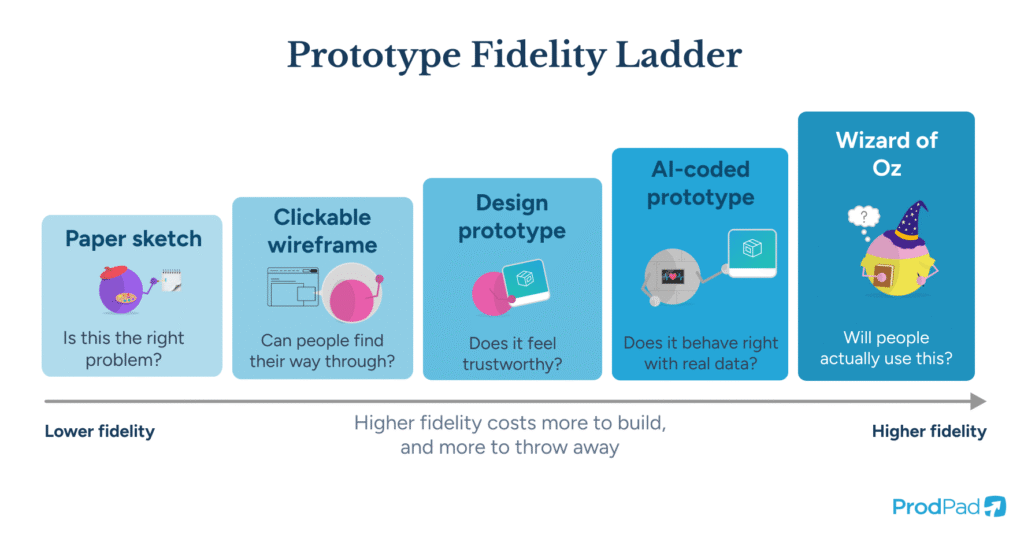
Every prototype is a stand-in. It simulates enough of a product for someone to react to it, while skipping everything that doesn’t matter to the question at hand. A prototype for a new onboarding flow might have no back end at all. A prototype for a pricing calculator might have real math and no styling. The parts you leave out are as deliberate as the parts you build.
A useful way to think about this comes from an old but still sharp piece of HCI research, Stephanie Houde and Charles Hill’s 1997 paper What Do Prototypes Prototype?. They argued that a prototype explores one or more of three dimensions: the role the product plays in someone’s life, its look and feel, and its implementation. Most arguments about prototypes come from people assuming different dimensions. A designer shows a prototype to test look and feel; an executive sees it and assumes the implementation is half done.
In Product Management specifically, a prototype sits inside product discovery. It’s one of several ways to test an idea before it earns a place on the roadmap, alongside customer interviews, fake door testing, and data analysis. Its particular strength is that it gives people something concrete to react to, which surfaces problems that a written spec never will.
What does a prototype actually test?
A prototype can only answer the questions you designed it to answer. Most product ideas carry more than one kind of risk, so it helps to name the one you’re testing. The right prototype for one risk is often the wrong prototype for another. Product teams usually sort these risks into four buckets.
Desirability: will anyone want this?
Desirability is the most expensive risk to get wrong and the hardest to test with a prototype alone. People are polite. Show a user a nice-looking concept and ask whether they’d use it, and most will say yes. A prototype tests desirability best when it asks people to do something with a cost attached: sign up, hand over real data, choose it over their current workaround. Buffer famously tested demand with little more than a landing page and a pricing step, well before the product existed.
Usability: can people figure it out?
Usability is where prototypes shine. A clickable flow put in front of five or six real users will expose confusing navigation, unclear labels, and dead ends faster than any internal review. This is the classic territory of user testing, and it’s the reason design teams prototype at all.
Feasibility: can we actually build it?
Some ideas look simple on screen and turn out to be brutal in the code. An engineer building a quick spike to check whether an integration, a data model, or a performance target is achievable is prototyping for feasibility. This overlaps heavily with a proof of concept and with technical feasibility assessment more broadly.
Viability: does it work for the business?
Viability covers pricing, margin, compliance, support load, and whether the idea fits the strategy at all. Prototypes test viability less often, though a pricing page prototype or a sales-led concept demo can give real signal. For teams in regulated industries (fintech, healthtech, govtech), a prototype walked through with a compliance lead early can save months of rework later.
How is a prototype different from a wireframe, mockup, proof of concept, or MVP?
Plenty of product teams use these five terms interchangeably, and the confusion causes real problems. When a stakeholder calls a prototype an MVP, they start expecting it to ship. When an engineer calls a proof of concept a prototype, the design team assumes nobody has thought about the user experience yet. Each artifact answers a different question. Being precise about which one you’re building keeps expectations honest.
| Artifact | What it is | The question it answers | Who usually sees it |
| Wireframe | A low-fidelity layout of structure and content, no visual design | Is the structure and flow right? | Internal team |
| Mockup | A static, visually detailed design with no interactivity | Does it look right? | Internal team, stakeholders |
| Prototype | An interactive simulation of the experience, at any fidelity | Does it work for the people using it? | Users, team, stakeholders |
| Proof of concept | A technical experiment, often with no real interface | Can we build it? | Engineering, technical leads |
| MVP | The smallest real product released to real customers | Will people use and pay for it in the real world? | Customers |
The table maps to ProdPad’s existing definitions of a wireframe, a proof of concept, and an MVP (minimum viable product).
Where does a prototype end and an MVP begin?
The most important line sits between the prototype and the MVP. A prototype is a simulation you’re prepared to throw away. An MVP is a real product with real customers, real support tickets, and real obligations. AI tools have blurred this line, because a coded prototype can now be deployed to a live URL in minutes, and a deployed prototype with real users on it starts behaving like an MVP whether anyone planned that or not.

A good test for which artifact you need is to write down the question first and then pick the cheapest artifact that can answer it. Teams that start with the artifact (“let’s build a prototype”) tend to build the most impressive version they can, which is rarely the cheapest one that would have answered the question.
What are the different types of prototype fidelity?
Fidelity describes how closely a prototype resembles the finished product, in both look and behavior. Higher fidelity costs more to build and to throw away, and it changes the kind of feedback you get. The Nielsen Norman Group has a useful breakdown of how fidelity shapes what users react to. The short version is that the rougher a prototype looks, the more freely people criticize the idea itself.
Low-fidelity prototype
A low-fidelity prototype is paper sketches, whiteboard drawings, or rough boxes in a design tool. It costs minutes to make and nothing to throw away, which is its whole appeal. Users feel free to say “this is the wrong thing entirely” to a sketch in a way they never will to a polished screen. Low fidelity is the right choice when the question is still about the problem or the overall approach.
Mid-fidelity prototype
A mid-fidelity prototype is usually a clickable flow in a tool like Figma [link: https://www.figma.com/], with real layout and navigation but placeholder content and minimal styling. It’s the workhorse for usability testing, because people can move through it and get stuck in the places real users would get stuck.
High-fidelity prototype
A high-fidelity prototype looks and behaves close to the finished product, with real visual design, realistic data, and detailed interactions. It’s the right tool late in discovery, once the team has validated the problem and is refining the details. Too early, it wastes effort and invites feedback on button colors while nobody examines the underlying idea.
Coded and Wizard of Oz prototypes
A coded prototype runs as real software, even if the code is throwaway. A Wizard of Oz prototype presents a working front end to users while a human does the work behind the scenes; a team testing an “automatic” report might have someone compile each report by hand for the first twenty customers. Both are powerful for testing behavior over time, because people use them in their actual workflow instead of in a test session. Both also carry the highest risk of being mistaken for a real product, by users and by your own leadership.
How has AI changed the prototype?
AI tools like Lovable, v0, Bolt, and Replit have collapsed the cost of building a coded prototype from weeks to minutes, and Product Managers have adopted them fast. Colin Matthews’ guide in Lenny’s Newsletter walks through turning a Figma screenshot or a written spec into a working prototype in about ten minutes. The State of B2B Product Management Report (March 2026) from b2bproduct.io found that 42% of product leaders and 37% of individual contributor PMs already use AI for creating wireframes and prototypes.
The upside is real. Product Managers can show an idea instead of describing it, which cuts out whole rounds of misinterpretation between Product, Design, and Engineering. Teams can explore three approaches in the time it used to take to spec one. Customer conversations get sharper when there’s something on screen to react to.
The downside shows up in the same report. Respondents worried about a flood of AI prototypes from colleagues pitching their own solutions, and about the design function being bypassed in favor of whatever a tool generates first. Both concerns trace back to the same dynamic: when a prototype takes ten minutes, it stops feeling like an experiment and starts feeling like an argument. A polished, working prototype carries a persuasive weight that a sketch never did, whether or not anyone has tested the idea underneath it.
See how other Product Managers are using AI day to day, prototyping included. Download the guide to Product Managers using AI tools👇
The practical effect is that the discipline around prototyping matters more now, and the craft of building one matters less. Anyone can produce the artifact. Knowing which question it should answer, and being honest about whether it answered it, is still the Product Manager’s job.
What does a prototype prove, and what does it not prove?
A prototype produces evidence, and evidence only counts toward the question it was designed to test. This sounds obvious, and teams still get it wrong constantly, because a successful prototype session feels like validation of the whole idea. The gap between what the prototype proved and what everyone believes it proved is where a lot of wasted engineering time begins.
A prototype proves the question it was built to answer
If you tested whether five users could complete a bulk-approval flow without help, and four of them could, you’ve learned something real about usability. You haven’t learned whether customers want bulk approval, whether it can handle ten thousand invoices, or whether finance teams will trust it with audit requirements. Each of those needs its own test.
What people say about a prototype differs from what they’ll do
Test sessions capture stated reactions: “I’d definitely use this.” Real usage captures behavior, and the two diverge all the time. This is why desirability is so hard to prove with a prototype, and why a prototype that people love in a session can still sit unused once it ships. Coded and Wizard of Oz prototypes narrow this gap, because people use them in real conditions.
Polish borrows credibility the idea hasn’t earned
A high-fidelity prototype signals effort, and effort signals commitment. Stakeholders who see a slick demo tend to assume the hard thinking is done and ask when it ships. Users who see a polished screen hold back their harsher feedback, because it looks like too much work went into it to criticize. Eric Ries made a similar point years ago about the prototype mindset, where the goal is maximum learning for minimum effort. AI has made polish nearly free, which makes this dynamic far more common.
How do you run a prototype well?
Good prototyping depends mostly on the decisions you make before you open a tool. The steps below work at any fidelity, from a paper sketch to a deployed AI build. The common thread is deciding in advance what would count as a result, so the prototype can actually change your mind.
Start with the riskiest assumption
Every idea rests on a stack of assumptions. Pick the one that would sink the idea if it turned out to be false, and write it down as a testable product hypothesis. “Finance managers will use bulk approval for invoices under $5,000 instead of approving them one by one” is testable. “Users want a better approvals experience” is not.
Choose the cheapest prototype that answers it
Match the fidelity to the assumption. A problem or approach question needs a sketch. A usability question needs a clickable flow. A behavior question may need something coded, or a Wizard of Oz setup. The cheapest option that can genuinely answer the question is almost always the right one, because it’s also the easiest to throw away.
Decide what result would change your mind
Before anyone sees the prototype, agree on what outcome would make you drop the idea, change it, or move forward. Without this, every result gets read as encouraging. “If fewer than three of six users complete the flow unaided, we redesign before going further” gives the session teeth.
A prototype only produces evidence when it starts from a written, testable product hypothesis.
Test with real users, then record what you learned
Internal reviews are useful for catching obvious gaps, and they’re no substitute for the people who’ll actually use the product. Once the sessions are done, write the result down against the idea it tested, including the parts that didn’t go well. A prototype result that lives only in someone’s memory or a lost Figma file is evidence your team will have to regenerate later.
Throw the prototype away
This is the hardest step, especially with AI-built prototypes that seem nearly production-ready. Prototype code is written for speed, without the security, accessibility, testing, or architecture a real product needs. Treating it as a head start usually means shipping its shortcuts. Carry the learning forward and let the artifact go. Letting a prototype linger because of the effort already spent is a textbook sunk cost trap.
Where does a prototype sit on the product roadmap?
A prototype belongs to an idea, and an idea is not a roadmap commitment. Keeping those two things separate is one of the simplest ways to stop prototypes from turning into accidental promises. The roadmap should show the problems your team is working on and how confident you are in each, and prototypes are one of the main ways that confidence changes.
On a Now-Next-Later roadmap, work is organized by certainty rather than dates. An idea in Later is a bet with thin evidence behind it. Prototyping is often exactly the work that sits in Now: small experiments designed to find out whether something deserves to move closer. When a prototype confirms a key assumption, confidence rises and the related initiative can move from Later toward Next. When it fails, the idea gets reshaped or dropped, cheaply, before anyone has written a line of production code. This is the logic behind confidence horizons, and it keeps the roadmap honest about what the team actually knows.

Notice the note on that card. The prototype raised confidence on one assumption (usability) and left another (demand) untested. A good roadmap makes that distinction visible, so a stakeholder seeing the card in Next understands exactly what has been proven and what hasn’t. This is also where prototypes connect to outcomes, the prototype is output, and the evidence it produces is what moves the team closer to an outcome.
Plan by confidence, not by dates. Download the free Now-Next-Later roadmap template👇

Where prototyping breaks down in product teams
When prototyping goes wrong, the failure usually sits in the handoffs around the prototype: an untested assumption waved through because the demo looked great, a result that never gets written down, a throwaway build that quietly becomes production code, a stakeholder who saw a clickable screen and heard a delivery date. These are system problems, and they get worse as prototypes get cheaper and more convincing.
The root cause is usually that prototypes live in one place and decisions live somewhere else. The prototype sits in Figma or on a Lovable URL. The hypothesis, if anyone wrote one, sits in a doc. The roadmap sits in a slide deck or a Jira board that only tracks delivery. Nothing connects the evidence to the idea it was supposed to test, so the evidence gets lost and the idea moves forward on enthusiasm.
This is the gap ProdPad is built to close. Ideas in ProdPad carry their hypotheses, experiments, and results alongside them, so a prototype’s outcome stays attached to the idea it tested. Those ideas connect to initiatives on a Now-Next-Later roadmap, which shows confidence instead of false dates. Your design and AI tools keep doing what they’re good at. ProdPad keeps the record of what the team learned and why each decision was made, so the next time someone shows a brilliant prototype, the first question in the room is which assumption it tested.
ProdPad keeps every prototype result attached to the idea it tested, so the evidence is there when decisions get made.
Enjoy a single source of truth for every product idea
Start a free trial and see how easy your Product Management life could be with ProdPad